Roles and containment
ssoosshd has three privileged roles, each an OIDC group named in config.
There is no database flag that makes someone an admin, and no screen that
grants the role: the identity provider stays authoritative, which is the whole
point of the design.
Configuration
Section titled “Configuration”admin: # Deployment-wide operations: the effective configuration, diagnostics, # claims echo, the directory status, sync and probe. Plus everything SOC # and auditor can do. require_group: "ssh-admins"
# Account writes: disabling and re-enabling a user, expiring an # enrollment. soc_group: "security-ops"
# Read-only: cross-user certificate history, the user directory, the # audit feed. auditor_group: "ssh-auditors"
# Shown on the account-disabled page, under the support contact. disabled_message: "Contact the security team with your ticket number."The account-disabled page names the same contact as the login page and the
footer: branding.support_email.
The older admin.contact_email is still read when branding.support_email is
unset, and the server logs a warning while it is the one in use.
All three group names are optional, and every one of them
fails closed: no identity,
no group membership, or no configured group all deny.
| Key | Empty means |
|---|---|
admin.require_group |
admin operations are disabled entirely |
admin.soc_group |
SOC operations narrow to admins, rather than being disabled |
admin.auditor_group |
auditor operations narrow to admins and SOC, rather than being disabled |
The roles nest. SOC is a child role of admin, and auditor is a child of both, so admins hold everything and SOC members hold the auditor views – they need the directory and the enrollment lists to find what to contain.
flowchart TD
    accTitle: How the three admin groups nest
    accDescr {
      Three configuration keys, each a superset of the one below it.
      admin.require_group grants deployment-wide operations, admin.soc_group
      grants account writes, and admin.auditor_group grants read-only views.
    }
    A["admin.require_group<br/>deployment-wide operations"] --> S["admin.soc_group<br/>account writes"]
    S --> V["admin.auditor_group<br/>read-only views"]
A fourth group sits outside that chain:
admin.nss_key_group
administers the NSS fleet keys.
Admins hold it too; SOC may revoke any key and auditors read them.
Containment is symmetric: whoever can disable an account can also re-enable it, whichever role or the directory sync disabled it. A SOC disable of every admin therefore never needs a database edit to undo. Every re-enable requires a reason and is audited with its actor, source address and time, so a SOC re-enable of an account an admin disabled deliberately is on the record.
What each role may do
Section titled “What each role may do”| Operation | Admin | SOC | Auditor |
|---|---|---|---|
| Disable a user | yes | yes | no |
| Re-enable a user | yes | yes | no |
| Expire any account’s enrollment early | yes | yes | no |
| User directory and per-user detail | yes | yes | yes |
| Certificate history across all users | yes | yes | yes |
| Service code directory and detail | yes | yes | yes |
| Audit feed, and one user’s timeline | yes | yes | yes |
| Directory status and last sync pass | yes | no | no |
| Run the directory sync by hand | yes | no | no |
| Probe the directory | yes | no | no |
| Echo your own IdP claims | yes | no | no |
| Run the deployment diagnostics | yes | no | no |
| Effective configuration | yes | no | no |
Running the sync is admin-only rather than SOC, even though a pass can disable an account: a pass acts on every account at once, restoring and refreshing access as readily as it removes it, while a SOC disable or re-enable acts on one account with a recorded reason. Probing is admin-only because it makes the server open an outbound connection and read a directory entry in full, which is a capability rather than a view. Reading the sync status is admin-only too: it names no credential, but it does name the directory connection, the query the probe is pinned to and the sync settings, which is the directory’s operating detail rather than anything a SOC or audit investigation needs. The whole Directory page is admin-only as a result. The deployment diagnostics are admin-only for the probe’s reason: a run makes the server dial its own public URL. The claims echo is admin-only because it drives a fresh sign-in against the identity provider, and what it shows is a configuration tool rather than an investigation one.
The web UI follows the same split. The Directory, Claims echo and Diagnostics pages are admin-only as whole pages: the rail does not offer them to SOC or auditors, and opening one by its address shows a “You do not have access to this page” card rather than a page whose only action the server would refuse.
One containment action needs no role at all. A holder of a service account can expire that account’s own codes from the code’s page; the row in the table is the cross-account version of the same action.
What no role may do, at all:
- Approve someone else’s request. Approval is bound to the requester.
- Raise a ceiling. The config file is the outer bound; nothing reachable over HTTP can make issuance more permissive than the loaded configuration allows.
- Grant a role. Membership comes from the identity provider.
- Touch the audit trail. It is append-only, and the shipped log is the archive.
A compromised web tier, or a rogue admin, can deny service. It cannot escalate.
What a person sees of their own access
Section titled “What a person sees of their own access”The account page names every role the session holds, not the narrowest
one. The roles nest, so an admin’s account page reads Admin SOC Auditor
and a SOC member’s reads SOC Auditor. Someone who holds no privileged
role sees no access row at all.
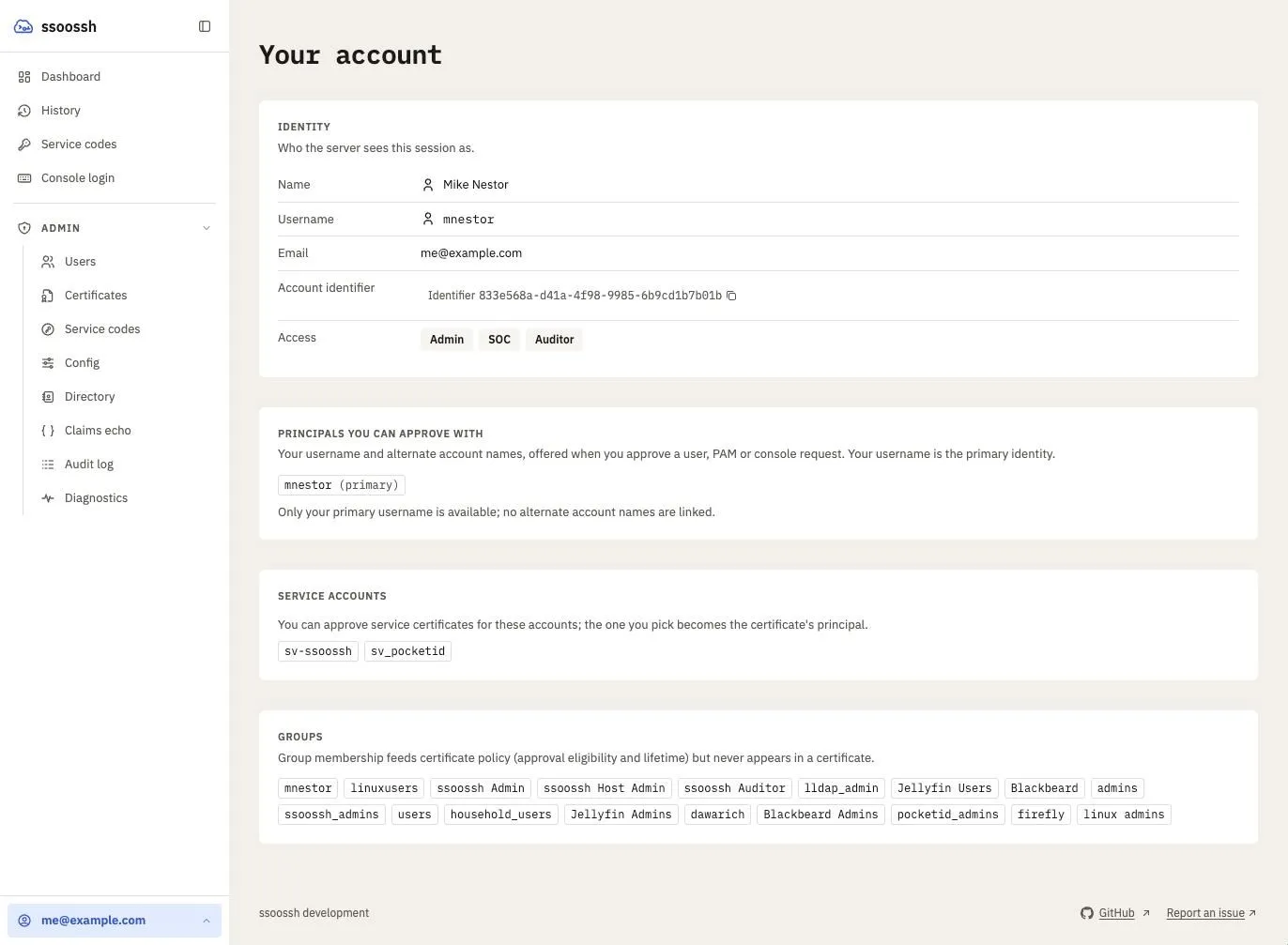
An admin's account page. The Access row names every role the session holds; the cards below it are what the server will put in, and consult for, this person's certificates.
This is display only. The badges come from the same
admin.require_group / admin.soc_group / admin.auditor_group membership
the server evaluates, and the server re-checks it on every scoped request, so
a badge cannot grant anything and its absence cannot take anything away.
What the user detail page shows
Section titled “What the user detail page shows”One user’s page carries everything the server has stored about them, all of it written by a login or a sync rather than captured for the page:
- OIDC record – exactly what the identity provider sent at this user’s
last login: the account identifier (the claim
authentication.fields.subjectnames, and the only field stable across logins), username, name, email, the account lists, and the extra fields the configuration captures. Where a configuredldap.fieldsentry replaces an OIDC field outright, the list is badged with the source the server actually acts on. - Group membership – every persisted group row with its source (
oidcorldap) and when it was first and last seen. Only names the configuration references are stored, so a group missing here is often one nothing is configured to care about. Never an authorization input. - Directory record – the LDAP bookkeeping row: the entry’s DN, the
stored field values, when the entry was last seen, and whether it is
currently missing (with how long it has been). Empty for a user who has
never been enriched, and absent entirely while
ldap.enabledis false – two states the page keeps apart, because one calls for a sync and the other for nothing. - Notification choices – only the ones this user has changed. Anything absent is on its default.
- What disabled the account, when it is disabled:
admin,soc, orldap_sync. That last one is the only source the sync will clear automatically.
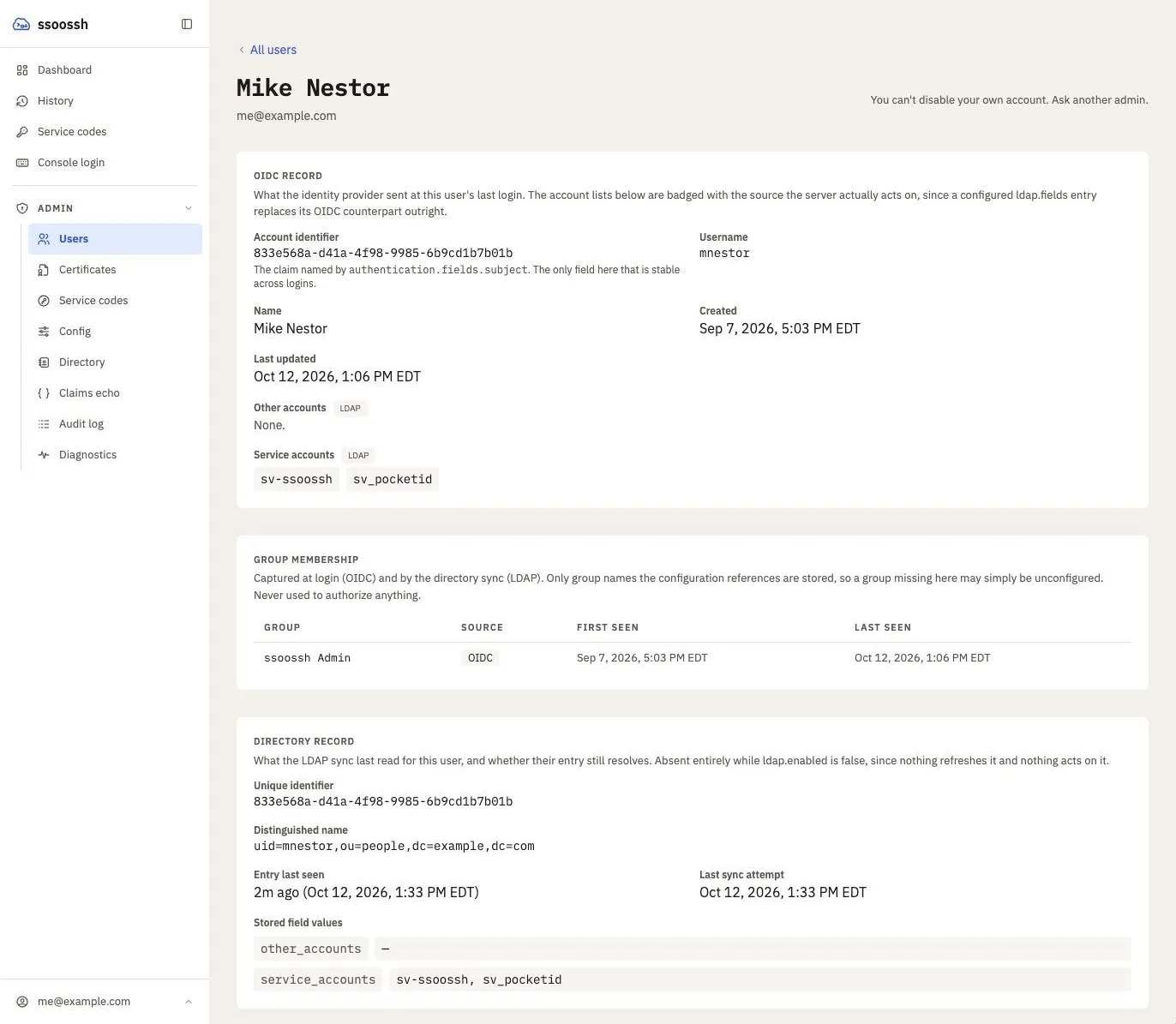
A user's page. The service accounts carry an LDAP badge because the configuration takes them from the directory; the OIDC value, had there been one, would be shown struck through beside it.
Between the group rows and the directory record, “why is this person missing a group” is answerable from the page. What it cannot show is a group the configuration never references, because those are discarded at capture – the probe console is what breaks that circle.
What admins see of the configuration
Section titled “What admins see of the configuration”The effective-configuration screen renders the server’s whole configuration, grouped by section in the same order as the file it describes, with every field tagged as a secret redacted rather than shown. That covers the CA private key, the OIDC client secret, the session cookie key, the database connection string, the LDAP bind password, the SMTP password, and the HSM PIN. A redacted value still tells an admin whether the setting is configured, which keeps “is the client secret set?” answerable without disclosing it.
![The Server configuration page: a filter box, a “Show unset keys” toggle, a count of keys set, and cards per section listing each key and value, with ssh_key and db.connection_string shown as [redacted] with a SECRET tag](/ssoossh/_astro/admin-config.djIt501s_Z158GOC.webp)
The effective configuration, grouped by section. A secret shows as redacted with a tag, so its presence is visible and its value is not.
Prefer the file-based spellings for secrets –
mail.smtp.password_file,
hsm.pin_file – so the secret is
not config text at all.
Disabling a user
Section titled “Disabling a user”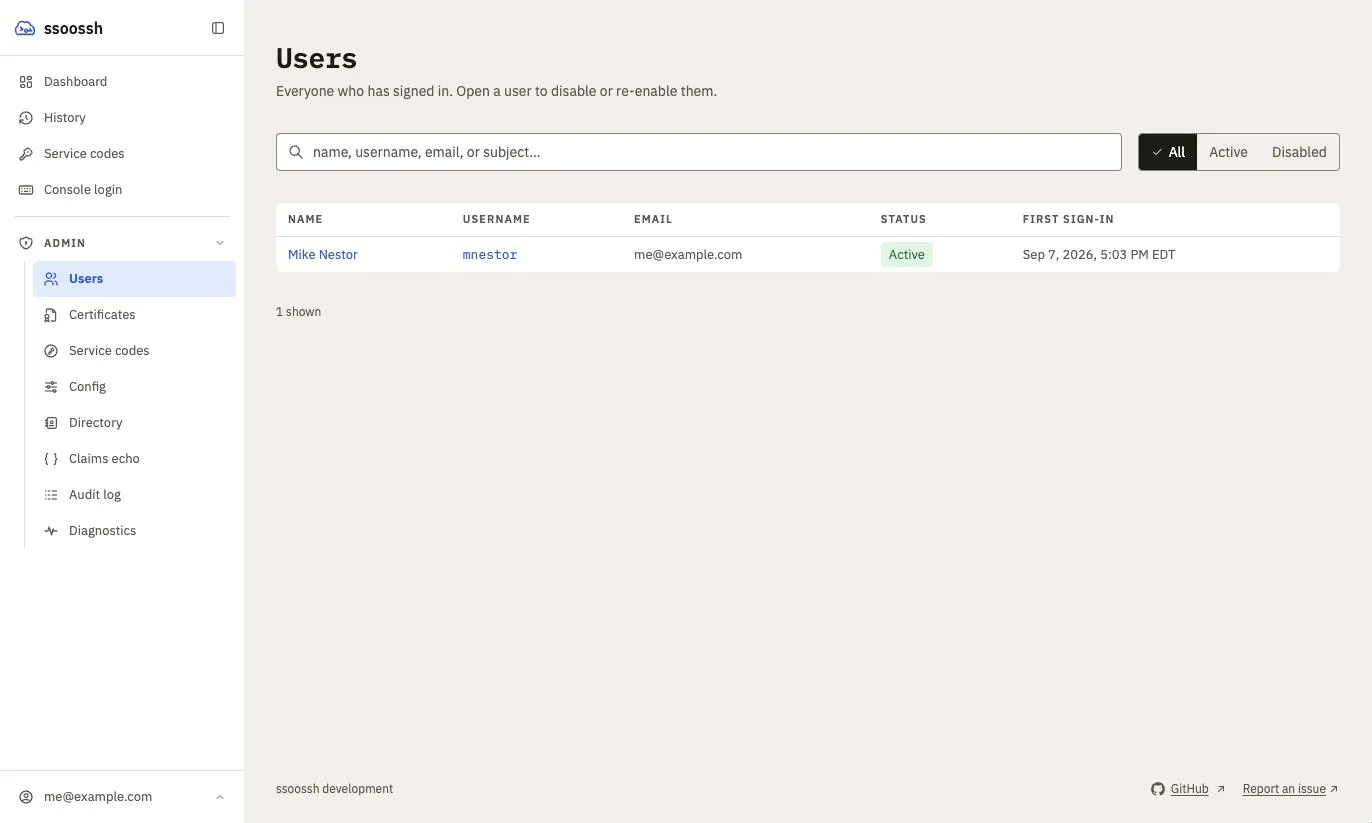
Admin → Users. A row opens the user's page, where the Disable control lives.
Disabling is the containment action. It is fail-closed at login: a transient
database error during the check denies rather than admits. The person lands on
a page carrying admin.contact_email
and admin.disabled_message
if those are set.
It does exactly that and no more. Service enrollments the person approved belong to their service accounts, not to them, so unattended jobs keep running and the account’s other holders keep control. If the intent is to stop a credential too, expire the enrollment as a separate, recorded action.
Nobody can disable their own account. Doing so would end the operator’s own
session, and only another admin could undo it, so the server refuses with 403
before it reads the request. The attempt is still recorded, as
user.disable_refused, on that account’s audit timeline, with the address the
server observed. The account itself is not touched.
The current state lives in denormalized columns on the user row –
disabled_at, disabled_by_user_id, disabled_reason, disabled_source –
which render the directory and the re-enable flow without touching the audit
table, and survive audit pruning. The audit trail is the history; those
columns are the present.
disabled_source is what makes the LDAP sync’s auto-disable safe to combine
with a human one. The sync clears only disables whose source is exactly
ldap_sync, so an admin or SOC disable is never undone automatically.
Disabling an account the sync already disabled replaces its source with the
operator’s, so from then on only an operator (SOC or admin) can restore it,
and a re-enable clears the source along with the rest. An auto-disable is audited like any
other containment action, as user.auto_disabled, with a generated reason
and no actor. Admins are not exempt: the sync disables them like anyone else,
and emails an admin it disables (see
When the sync disables an admin).
See LDAP enrichment.
Enrollments cannot be reassigned
Section titled “Enrollments cannot be reassigned”There is no transfer operation, and this is the one place an older configuration example may still say otherwise. An enrollment is owned by its service account: every holder of the account sees its codes and can act on them, whoever approved them. That removed the need for a transfer, so the operation went away with it.
The consequences worth knowing:
- The
enrollment.reassignedaudit action stays defined so events recorded before the change still read back with a name, but nothing emits it. - The
enrollment_reassignmentstable is frozen and still read: its rows record transfers that really happened. - What an admin or SOC member can do to an enrollment is expire it early, which is idempotent.
Required reasons
Section titled “Required reasons”A reason is required and server-validated – non-empty after trimming, capped at 1000 characters – on the containment and restorative actions:
| Action | Why the reason matters |
|---|---|
user.disabled |
the motivating case: the next person deciding whether to re-enable has to be able to see why |
user.enabled |
“cleared with security, SEC-1234” is as valuable to the person after that one |
enrollment.expired |
the credential is gone and something unattended will start failing |
The API refuses the action rather than recording one that says nothing, and the web UI keeps the confirm button disabled until a reason is typed. Optional reason fields do not get filled; required ones cost seconds at action time and are the whole point later.
System-initiated events generate their own reason text, since no human is present to supply one. View events carry none.
The session lifetime is the revocation window
Section titled “The session lifetime is the revocation window”Authorization is evaluated from the session identity, and group membership is read at login. So removing someone from an admin group in the identity provider takes effect at their next login, not immediately.
With a directory, that window can be shortened for the role groups:
ldap.authoritative_role_groups
lets the sync take admin, SOC, auditor or fleet key admin away from a linked
user between logins, effective on their next request, while still never
granting a role (see
Authoritative role groups).
This applies to roles only. The account lists a certificate’s principals come from are re-read from the database on every request, so a directory sync that removes a linked account takes it away from live sessions immediately (see LDAP enrichment).
That window is bounded by the session settings:
| Key | Default | Meaning |
|---|---|---|
http.cookie_max_age |
9h |
the absolute cap, measured from login. Activity never extends it |
http.cookie_idle_timeout |
30m |
how long a session survives without a request. Slides on activity, so an actively used session ends only at cookie_max_age |
Shorten cookie_max_age if that window is too long for your threat model.
The idle timeout must not exceed the absolute cap – an idle window longer
than the cap could never be reached.
To take access away right now, disable the person: that check runs at login and is fail-closed, and it is the containment action the audit trail is built around. Certificates they already hold expire on their own, which is why there is no revocation list to maintain.
A full roles block is on Server configuration examples, and every recorded action is listed on Audit log.