Service accounts
A service account is a non-interactive identity – a backup job, a CI runner, a cron entry – that needs an SSH certificate without a person at a browser every time. A human is involved exactly once, at enrollment. Everything after that runs from an enrollment code.
The certificate a code produces is an ordinary user-type SSH certificate; there is no separate service certificate type on the wire. What differs is how it is obtained.
sequenceDiagram
    accTitle: Enrolling a service key once, then reissuing without a human
    accDescr {
      An operator runs service enroll with a key path. The client sends the
      public key to the server, which opens an approval page in the operator’s
      browser; the operator approves, choosing a service account. The server
      returns an enrollment code, the account and an expiry, which the client
      prints once and stores nowhere. Later, a scheduled job runs service
      retrieve with that code and key: the client sends only the code, and the
      server returns a certificate for the enrolled key.
    }
    autonumber
    actor Operator
    participant Client as ssoossh client
    participant Server as ssoossh server
    participant Job as scheduled job

    Operator->>Client: service enroll --key /etc/backup/id
    Client->>Server: public key
    Server-->>Operator: approval page in a browser
    Operator->>Server: approve, choosing a service account
    Server-->>Client: enrollment code, account, expiry
    Note over Client: printed once, stored nowhere
    Job->>Client: service retrieve --code ... --key ...
    Client->>Server: the code only
    Server-->>Client: certificate for the enrolled key
1. Enroll
Section titled “1. Enroll”ssoossh service enroll --key /etc/backup/id--key names the keypair, and what is already on disk decides what happens:
| On disk | What enroll does |
|---|---|
Neither /etc/backup/id nor /etc/backup/id.pub |
Generates both: the private key 0600, the public key 0644 |
| Both | Enrolls the existing /etc/backup/id.pub, leaving the private half untouched |
| Only one of the two | Fails, naming the missing file |
The half-present cases are errors rather than something to work around: ssh
will not use a certificate without the private key beside it, so an enrollment
built from a lone public key produces certificates nothing on that host can
present.
The file names follow the OpenSSH convention and are not negotiable: the
private key is <name>, the public key <name>.pub, the certificate
<name>-cert.pub, and all three must be in the same directory for ssh to
find them.
The command prints an approval URL and waits. A human approves it in the
browser and picks which of their service accounts the enrollment mints for –
the requesting machine does not choose, and cannot. When approval lands, the
command prints the enrollment code, the account it was approved for, when the
code stops being redeemable, the three file paths, and a ready-to-paste
ssh_config recipe.
Add --retrieve to redeem the code once immediately and write the first
certificate, which proves the enrollment works rather than leaving you to find
out when cron first runs:
ssoossh service enroll --key /etc/backup/id --retrieveIf that retrieval fails after the code has been printed, the command returns an error but the code is not lost.
2. Retrieve
Section titled “2. Retrieve”Later, and on a schedule, the job redeems its code:
ssoossh service retrieve --code K7M4QP2X --key /etc/backup/idThe certificate is written to /etc/backup/id-cert.pub.
| Flag | Default | What it does |
|---|---|---|
--code |
required | The enrollment code to redeem |
--key |
required | The keypair path; the certificate lands at <path>-cert.pub |
--grace |
1m |
How much validity a certificate on disk must still have to count as fresh |
--force |
off | Retrieve regardless of what is on disk |
The exit behavior is built for Match exec, where a non-zero exit blocks the
connection:
| Situation | Result |
|---|---|
A certificate at <path>-cert.pub is valid beyond --grace |
Nothing fetched, exit 0 |
| Retrieval fails but a still-valid certificate exists | Warning printed, exit 0, provided the client has cached the CA key from an earlier run; with no cached key it cannot start and exits non-zero |
| No readable, valid certificate and retrieval fails | Error, non-zero exit |
--grace is what keeps a job that runs every minute from asking the server for
a new certificate every minute. --force is the escape hatch for when you need
to know the fetch actually happened. Durations are a number followed by s,
m, or h.
Each call sends only the code. The public key is never resubmitted, because the server already holds the one the code is bound to – so a stolen code cannot be paired with an attacker’s own keypair, and every certificate it produces is useless without the private key sitting beside it on disk.
Use case: a nightly backup job
Section titled “Use case: a nightly backup job”The backup runs as its own local account and connects to a fleet of hosts. Enroll once as the operator:
sudo install -d -o backup -g backup -m 0700 /etc/backupsudo -u backup ssoossh service enroll --key /etc/backup/id --retrieveThen let ssh refresh the certificate itself, so nothing else has to be
scheduled:
Match user backup-bot exec 'ssoossh service retrieve --code K7M4QP2X --key /etc/backup/id' IdentityFile /etc/backup/id IdentitiesOnly yesNo CertificateFile line is needed: ssh derives /etc/backup/id-cert.pub
from IdentityFile’s name. Match exec runs before ssh reads the key files,
so this needs no agent.
# the backup itself, unchangedrsync -a /var/lib/app/ backup-bot@store.example.com:/srv/backups/app/Use case: a CI runner
Section titled “Use case: a CI runner”A runner has no long-lived ssh_config, so retrieve explicitly as a step
before the one that connects. Keep the code in the CI system’s secret store and
pass it through the environment:
#!/bin/shset -euinstall -m 0600 /dev/null "$RUNNER_TEMP/id"install -m 0644 /dev/null "$RUNNER_TEMP/id.pub"# ... place the enrolled keypair from the secret store into those two files ...
ssoossh service retrieve --code "$SSOOSSH_CODE" --key "$RUNNER_TEMP/id" --forcessh -i "$RUNNER_TEMP/id" -o IdentitiesOnly=yes deploy-bot@app.example.com ./deploy.sh
--force is right here: a fresh container has nothing cached, and a runner that
silently reuses a certificate baked into an image is the failure this avoids.
Use case: cron on a host
Section titled “Use case: cron on a host”Where the job is not ssh itself – a script that shells out several times, or
a tool that will not read ssh_config – refresh on a timer instead and let
--grace do the deduplication.
[Unit]Description=Refresh the deploy-bot ssoossh certificate
[Service]Type=oneshotUser=deployExecStart=/usr/bin/ssoossh service retrieve --code K7M4QP2X --key /etc/deploy/id --grace 15m[Unit]Description=Refresh the deploy-bot ssoossh certificate
[Timer]OnBootSec=1minOnUnitActiveSec=5min
[Install]WantedBy=timers.targetThe plain cron equivalent:
*/5 * * * * deploy /usr/bin/ssoossh service retrieve --code K7M4QP2X --key /etc/deploy/id --grace 15mRunning every five minutes with a fifteen-minute grace means the server is called only when the certificate is genuinely close to expiring, and there are two further attempts before it does.
What the approver controls
Section titled “What the approver controls”Everything durable about an enrollment is fixed at approval, not requested by the client:
- The account it mints for. It is the sole principal of every certificate the code produces, chosen by the approver from the accounts they hold.
- The certificate options granted, narrowed against server configuration before they are fixed.
- How long the code stays redeemable, via
cert_options.service.enrollment_duration. - How long each issued certificate is valid, via
cert_options.service.valid_duration, measured from each redemption.
The key ID and principals render from the approver’s login, because the approving identity is long gone by the time a scheduled job redeems the code.
Afterwards the approver – and every other holder of the account – can open the code’s own page under Service codes in the web UI. It shows what the code hands out (the principal, the certificate lifetime, the key ID, and the fingerprint of the keypair the code is bound to), the code itself as one valid period with the time remaining, who approved it and with which options, everyone who holds the account, the notification address, and a redemption history naming each fetch’s address and serial. Never the code.
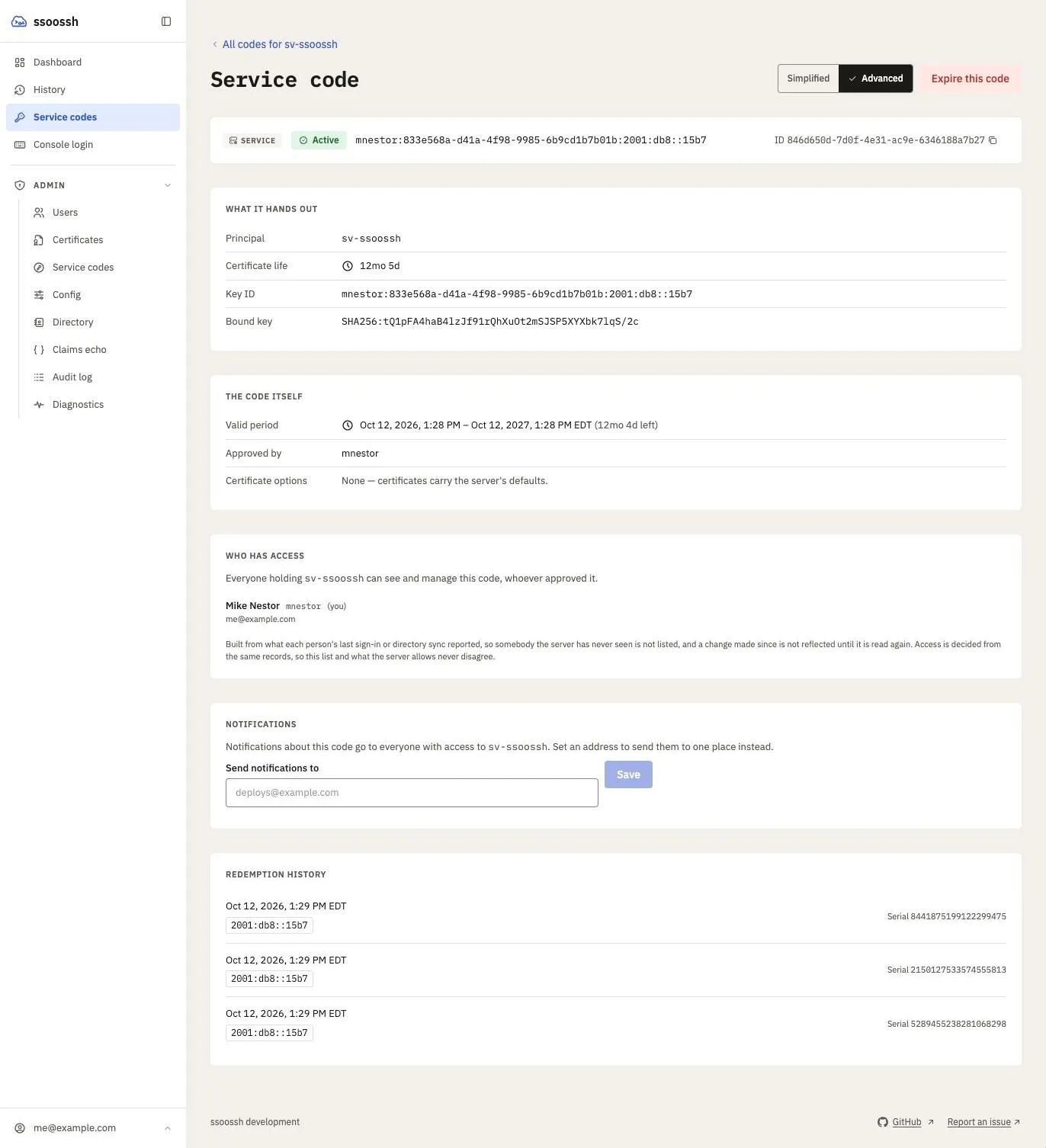
A holder's view of an expired code. A live one carries an Expire this code control below the notification address; it asks for a reason, and the reason is recorded.
Any holder can end a code early from that page with Expire this code. A reason is required – the control will not submit without one – and it lands in the audit stream. Expiring a code that has already expired changes nothing: the original expiry stands.
The holder list is bounded by who has signed in: the server never reads a directory to enumerate an account’s holders, so it names everyone known to hold the account rather than everyone who does. Someone who has never logged in holds the account and does not appear.
An operator with an enrollment id – from a notification email, an
enrollment.* audit event, or a server log line – can paste it into the
search on Admin → Service codes, or open /admin/service-codes/<id>
directly. The search also matches the service account, the key ID, the
certificate request id, and the approver’s username or email, and it is a
substring match, so the shortened id the code’s page shows is enough. That
id is a button: clicking it copies the whole value.
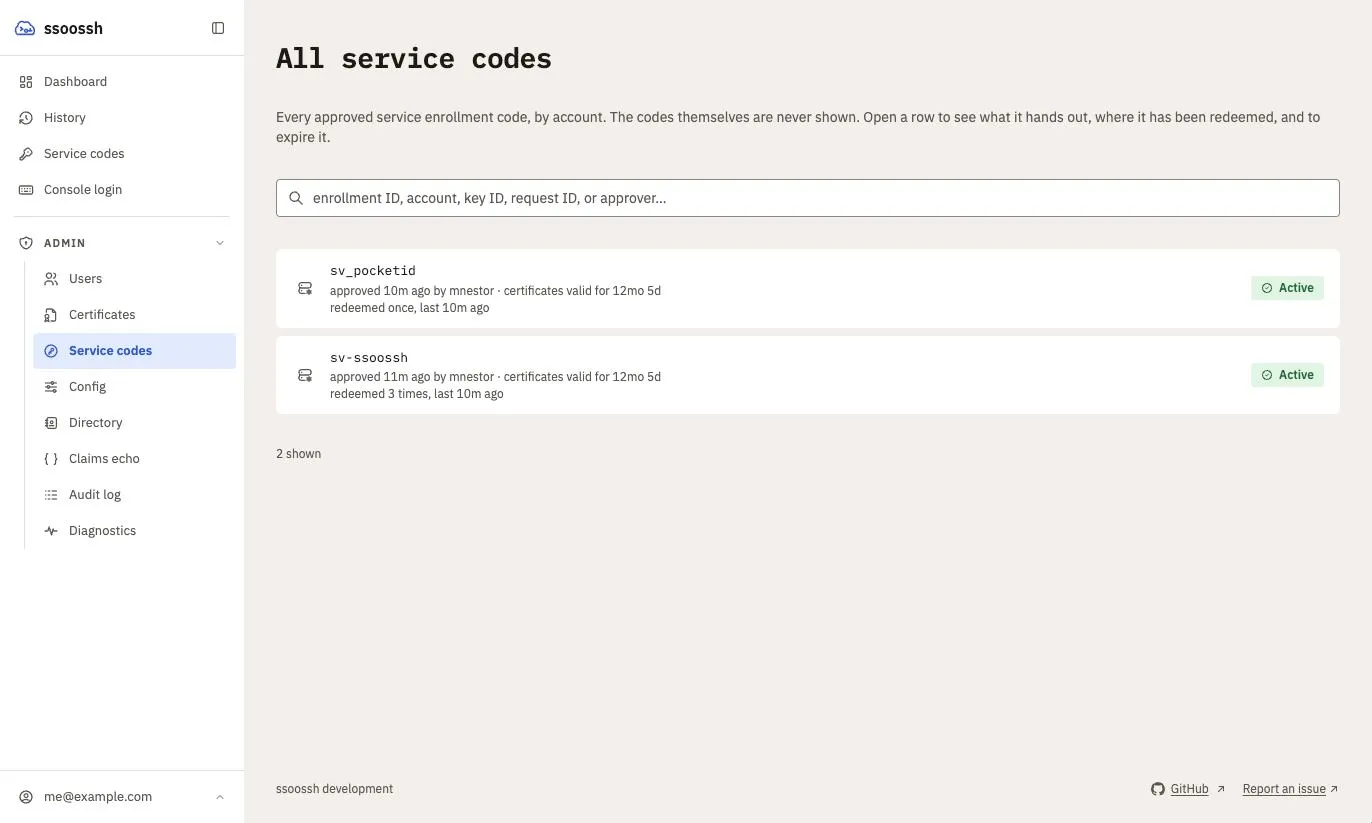
The admin view of every approved code across all accounts. The search is a substring match on any of the identifiers an operator is likely to be holding.
Enrolling under your own account
Section titled “Enrolling under your own account”Not every deployment has a service-account claim to map. Where there is none, someone who has to run something unattended under their own account – a cron entry, a backup, a scheduled fetch – has no way to get a reusable code, and tends to leave an interactive credential on the host instead, which is worse.
cert_options.service.allow_user_accounts
lets an approver name one of their own accounts (their username, or an entry
from other_accounts) as the service account, alongside anything the
service_accounts claim gives them. The approval page lists those separately,
under “Your own accounts”, and says what they produce before the choice is
made.
What it produces is a service certificate in every respect: one principal, and
the options
cert_options.service grants
rather than the ones cert_options.user grants – which with the default empty
extension set means no permit-pty, and so no shell. The setting changes which
account may be named, not what the certificate is.
A deployment that puts permit-pty in cert_options.service.extensions has
made every service certificate interactive, personal accounts or not; that is a
decision about that key, not about this one.
It is off by default, because turning it on widens what an approver may mint for themselves from “the accounts a claim vouches for” to “any account they hold”. Every account in that wider set is already theirs, but it is still a widening.
Notifications
Section titled “Notifications”If the deployment has email enabled, four notifications concern an enrollment.
All of them go to every holder of the service account, resolved at delivery,
unless a notification address was set on the enrollment – in which case that
address is the sole recipient. With allow_user_accounts on, the holder of an
account that is someone’s own is that person, so a code enrolled under a
personal account notifies them.
| Notification | When | Default |
|---|---|---|
| Service enrollment created | You approve a request and a code is minted | on |
| Service enrollment redeemed | Every redemption, including ones where signing failed | on |
| Service enrollment expiring | Weekly inside the reminder window, then daily over the final week | on |
| Expired enrollment code used | An expired code is presented for redemption | on |
The “created” message carries everything the enroll command printed except
the code: the account, the key fingerprint, the expiry, the ssh_config
recipe. The code is in no message, deliberately. The expiring reminder tells you
to run ssoossh service enroll again rather than offering anything to reuse.
“Expired enrollment code used” is rate-limited rather than one-shot, because what it usually reports is a cron job holding a dead code and failing on its own schedule indefinitely. Each holder’s own preferences gate their own copy.
Set the notification address on the approval page, or afterwards from the service codes page (any holder) or the admin console (SOC). Clearing it restores the fan-out. Changing it is recorded in the audit stream with both the old and the new value.
Containment
Section titled “Containment”Every holder of a service account can see its enrollments and end one early
from the code’s page, with no role at all. The admin and SOC roles, gated by
admin.require_group and admin.soc_group,
can do the same for any account from Admin → Service codes. Both paths
require a reason and record it. Expiring an enrollment early stops it minting new certificates; certificates it
already issued stay valid until their own valid_duration runs out, which is
what keeps that duration short.
Disabling the person who approved an enrollment does not stop it. The enrollment belongs to the service account, not to the approver, so the unattended job keeps running and the account’s other holders keep control.