LDAP enrichment
Optional directory data on top of the OIDC identity: extra principals, persisted groups, and auto-disable when someone leaves the directory. It is off by default, and enabling it changes what identities carry, not how authentication works.
Enrichment, never a requirement
Section titled “Enrichment, never a requirement”If directory data is available a user gets more. If it is not, every basic operation still works on OIDC claims alone.
Login therefore fails open: an LDAP error during the callback logs to the
LDAP destination and proceeds with the OIDC-only identity. There is
deliberately no required knob. The consequence to hold onto is that a
misconfigured directory looks exactly like a working one from the outside,
which is why the configuration is validated at startup rather than left to be
discovered.
Only known users sync. A user must have logged in at least once to
participate in enrichment refresh, sync, or group capture. Enrichment never
enumerates the directory, which keeps the user set self-selecting and leaves
fan-out building on a bounded, consented population. The
NSS directory is the one exception, and a
separate sync: with nss.enabled it stores every POSIX entry its filters
select, whether or not anyone has logged in.
Switching the directory off
Section titled “Switching the directory off”Setting ldap.enabled: false stops the sync, so everything the directory
wrote is frozen at whatever the last pass read. The server stops acting on all
of it, immediately and everywhere:
- Certificate principals. A live session falls back to the OIDC values on its very next request – the per-request identity refresh reads the users row and overlays nothing. A principal the directory supplied stops being offered without waiting for anyone to log in again.
- Notification fan-out. Group resolution counts only the OIDC rows. A membership frozen on the day the directory was switched off does not route mail.
- The admin console. The directory record and the directory-sourced group rows are withheld from the user detail page, and the page says why. Frozen data shown beside live data with nothing to tell them apart is how someone grants access on a principal list that has not been true for months.
Nothing is deleted. Switching the directory back on restores the record without waiting for a sync pass.
Configuration
Section titled “Configuration”ldap: enabled: true url: "ldaps://ldap.example.net" bind_dn: "cn=ssoossh,ou=service,dc=example,dc=net" bind_password: "..." base_dn: "ou=people,dc=example,dc=net"
# The entry's unique, immutable identifier. Set this: it is what lets a # renamed or relocated entry be found again. See "Surviving a rename". id_attribute: entryUUID
# A Go template over the OIDC identity: {{.Username}}, {{.Email}}, # {{.Subject}}, {{.Extra.<name>}}. Values are RFC 4515 escaped # automatically and the operator cannot opt out. # It must reference at least one of those fields, or the server refuses # to start: a filter with none would resolve every login to the same # entry. No ldap.schema preset sets it. user_filter: "(&(objectClass=person)(uid={{.Username}}))"
fields: name: displayName # the person's human-readable name groups: memberOf # shorthand for {attribute: memberOf} other_accounts: attribute: sAMAccountName # the person's own entry searches: - name: "admin accounts" filter: "(&(objectClass=person)(authorizedUser={{.Username}}))" value: uid service_accounts: searches: - name: "owned service accounts" filter: "(&(objectClass=account)(owner={{.DN}}))" value: uid department: departmentNumber # any other key: an extra template field
sync: interval: 15m # zero disables the sync job entirely disable_after: 45m # how long an entry may stay missing before disable reenable: true # the sync may clear its own disables extra_groups: [] # persisted in addition to config-referenced names
timeout: 5s start_tls: false # for ldap:// URLs tls_ca: "" # PEM bundle; empty uses the system roots tls_insecure_skip_verify: false # homelab escape hatch, warns at startup
limits: max_values_per_attribute: 1000 max_entries_per_search: 1000 max_attributes_bytes: 65536
logging: filename: /var/log/ssoossh/ldap.log| Key | Default | Notes |
|---|---|---|
ldap.enabled |
false |
turns on the login-time lookup and the background sync |
ldap.url |
empty | e.g. ldaps://ldap.example.net |
ldap.bind_dn / bind_password |
empty | the implicit “simple” bind mechanism |
ldap.base_dn |
empty | the user lookup base, and the default base for field searches that name none |
ldap.schema |
empty | a preset for id_attribute and the NSS keys: rfc2307, rfc2307bis, active-directory, lldap or freeipa; see LDAP schema presets |
ldap.id_attribute |
empty | the entry’s unique, immutable identifier; see Surviving a rename |
ldap.user_filter |
empty | the template above |
ldap.fields |
none | destinations mapped to directory sources; reserved names are other_accounts, service_accounts, groups and name |
ldap.group_name_attribute |
empty | the attribute a group search reads a name from |
ldap.timeout |
5s |
bounds each directory operation, and so bounds the latency enrichment adds to a login |
ldap.start_tls |
false |
upgrades a plain ldap:// connection; irrelevant for ldaps:// |
ldap.tls_ca |
empty | PEM bundle; empty uses the system roots |
ldap.tls_insecure_skip_verify |
false |
a homelab escape hatch, logged loudly at startup |
ldap.limits.* |
1000 / 1000 / 65536 | caps what one directory can push into the database |
LDAP activity is routed to its own log destination by a type=ldap attribute:
ldap.logging.level and
friends. Give it a filename to split it into its own rotating file.
Field mapping
Section titled “Field mapping”ldap.fields mirrors
authentication.fields,
with attribute names instead of claim names. The reserved destinations are
other_accounts, service_accounts, groups and name; any other key is
an extra template field, on the same contract as authentication.fields.extra –
reachable in key ID templates as
{{.Extra.<name>}}, stored empty when absent, and never a reason for login to
fail. There is no separate extra: sub-map, because LDAP enrichment is extra
by definition.
username, email and subject are rejected here. The subject keys the
user row, the username is what lookups are keyed by, and the OIDC email
claim is the source of truth for the user’s email. Configuring one could only
read as an attempt to override identity.
name is not in that set, and the directory is usually the better source for
it: displayName or cn is maintained there even when the identity provider
omits a name claim from the token. It is display only – shown in the web UI
and offered to email templates,
never a certificate principal, a key ID input, or an authorization input. Only
the first value is taken, since a multi-valued cn names the same person
twice and joining them would produce a label no directory holds.
The merge rule is per field. A configured LDAP field (any attribute or
searches) wins over the OIDC value; an unconfigured one leaves the OIDC
value untouched. Override rather than union, because union makes it impossible
to retire a stale principal from only one source.
Groups are the exception. Both sources persist side by side in user_groups,
and the session identity’s groups stay the OIDC claim.
Account linking
Section titled “Account linking”A person’s alternate accounts appear in directories in four shapes, and all four are expressible:
- Forward list on the person’s entry. A multi-valued attribute of account
names. Covered by
attributealone; no search. - Reverse link by username. The alternate account is its own entry
carrying the usernames allowed to use it. A
searchesentry whose filter references{{.Username}}. - Reverse link by another identifier. Same, but linked by an employee
number or UUID rather than the username. The filter references
{{.Attr.<name>}}, an attribute of the primary entry – and the server collects every attribute name referenced this way and requests it in the primary lookup automatically, so nothing has to be duplicated as an extra field. - Reverse links with roles. The same alternate entries linked by
different attributes: an ownership link (
owner={{.DN}}) placed underservice_accountsgrants manage-and-enroll, while an authorized-user link underother_accountsgrants a usable principal. Which link means which is decided by where the search is placed.
Everything under one field unions and dedupes: its attribute plus each of
its searches. The per-field override rule then applies to the combined
result.
Group storage
Section titled “Group storage”user_groups holds one row per (user, group, source), where source is oidc
or ldap. Rows rather than JSON, so “everyone in soc” is one indexed query.
Only group names the configuration references are persisted. The allowlist
is the union of
admin.require_group,
admin.soc_group,
admin.auditor_group,
admin.nss_key_group, every
group name appearing in certificate policy (both require gates and tier
conditions), plus
ldap.sync.extra_groups.
Membership outside that set is discarded at capture time: the server records
the roles it acts on, it does not mirror the directory’s group graph.
Adding a name to the configuration self-heals rather than needing a backfill. LDAP rows repopulate at the next sync tick, OIDC rows at each user’s next login. Until then the new group simply has no members recorded, which fails in the quiet direction.
memberOf yields DNs; the allowlist compares names. A value that parses as a
DN is reduced to its first RDN value (conventionally the CN), and a value that
is already a name is kept as-is.
This table is useful with LDAP disabled: OIDC group capture alone gives notifications a fan-out target, just a staler one – per login rather than per sync.
Authoritative role groups
Section titled “Authoritative role groups”Off by default. With
ldap.authoritative_role_groups
on, the directory can take a role away between logins, and never grant one.
What it narrows. The role groups are exactly
admin.require_group,
admin.soc_group,
admin.auditor_group and
admin.nss_key_group
(fleet key admin). For a directory-linked user, a role group in the OIDC
claim counts only while the user’s latest directory read still lists it. A
group the directory lists but the claim does not carry is never added: a
person needs the group in both places to hold the role.
When it applies. On every authenticated request, so a sync that stops listing someone’s admin group takes admin away from their live sessions on their next request, not at their next login. A fresh login is narrowed the same way, and so is who counts as an admin for the admin email and for the auto-disable email. The session keeps the login’s claim and narrows it afresh each time, so a role the directory lists again counts again on the next request, without another login.
Who it applies to. Only a linked user: one the server has resolved a
directory entry for, meaning a user_ldap row with a DN or a directory id.
Someone never matched in the directory, or anyone while LDAP is off, is never
narrowed.
What “the latest directory read” means. The LDAP rows in user_groups, as
the last successful login lookup or sync pass wrote them. A read that fails
(the directory unreachable, a bind or search error, a field search that
fails) rewrites nothing, so an outage never takes a role away. A user the sync
finds missing from the directory keeps the rows of their last successful
read: a missing entry is
sync.disable_after’s
business, and it disables the whole account rather than trimming its roles.
Names have to match exactly. The comparison is the exact string match the
role checks use. Directory groups are stored reduced to their CN (a memberOf
DN becomes its first RDN value), so each role group name must be the same
string in the identity provider’s groups claim and as the directory group’s
CN. An identity provider that emits full DNs as group values cannot be used
with this setting: no stored CN would ever equal the configured DN, and every
role would be removed.
Only roles. Lifetime policy group conditions, cert_options require
gates and the groups that manage individual NSS keys are not narrowed – unless
they name a role group itself. Narrowing removes the group name from the
session’s group list, so every check that reads that list loses it, which can
only narrow further.
What it leaves behind. A read that takes away a role group the user holds
through OIDC writes one user.role_narrowed_by_directory audit event, naming
the groups and whether a login or the sync made the read. That is one event
per change, not one per request. A login that narrows records the removed
groups on its auth.login event as role_groups_removed_by_directory, and
each live session logs the change once at INFO when a role stops counting and
again when it counts again.
The sync
Section titled “The sync”Runs every ldap.sync.interval
over every user with a user_ldap row.
flowchart TD
    accTitle: What one LDAP sync tick does for each known user
    accDescr {
      For each user the sync first searches by id_attribute. Found means
      refresh: attributes and groups are updated, last_seen_at and the DN are
      written, and any open first_missing_at is cleared. If the attribute is
      unset, absent or the search failed, the entry is read by DN instead, and
      that too leads to a refresh when found. A failed DN read falls back to
      one filter search, which re-anchors an entry that has moved. A search
      that succeeded but found nothing opens first_missing_at if it is not
      already open; once the user has been missing for at least disable_after,
      they are disabled with disabled_source set to ldap_sync, and otherwise
      the next tick waits. A directory that is unreachable, or a bind that
      failed, changes nothing and counts nothing but logs loudly. Finally, a
      refreshed user who had been disabled by ldap_sync has that disable
      cleared if re-enabling is switched on.
    }
    S["Sync tick, per known user"] --> I{"Search by id_attribute"}
    I -- "found" --> R["Refresh attributes and groups,<br/>update last_seen_at and DN,<br/>clear first_missing_at"]
    I -- "unset, absent or failed" --> D{"Read entry by DN"}
    D -- "found" --> R
    D -- "DN read failed" --> F["One filter search:<br/>a moved entry re-anchors"]
    F -- "found" --> R
    F -- "search succeeded, no entry" --> M["Open first_missing_at<br/>if it is not already set"]
    M --> T{"missing for<br/>>= disable_after?"}
    T -- "yes" --> X["Disable, disabled_source = ldap_sync"]
    T -- "no" --> W["Wait for the next tick"]
    D -- "unreachable or bind failed" --> N["Change nothing, count nothing,<br/>log loudly"]
    R --> E{"Disabled by ldap_sync,<br/>and reenable on?"}
    E -- "yes" --> C["Clear the disable"]
The login path walks the same three anchors in the same order, so a login and a sync pass can never resolve a person differently.
- Search by
ldap.id_attribute, the only anchor that does not move. Skipped entirely when it is unset or nothing has been stored yet. - Read the entry by DN, which is cheap and distinguishes “entry deleted” from “filter no longer matches”. A failed DN read falls back to one filter search, so a moved entry re-anchors instead of being disabled.
- Found: refresh attributes and LDAP group rows, update
last_seen_at, and clearfirst_missing_at– the window closes outright, so an absence that ended never counts toward a later one. If the user is disabled withdisabled_source = ldap_syncandsync.reenableis on, clear it. - Not found (search succeeded, no entry): set
first_missing_atif it is not already set, leaving it alone on later passes. Once the entry has been missing forsync.disable_after, disable the user withdisabled_source = ldap_sync. - Directory unreachable or bind failed: update nothing, count nothing, log loudly.
Surviving a rename
Section titled “Surviving a rename”Set ldap.id_attribute. It is
the single most valuable line in this file, and it is empty by default only
because no value is right for every directory.
Without it there are two anchors, and both move:
- The DN changes when someone is moved between OUs, or when their RDN is built from a name that changed.
- The
user_filterstops matching the moment they are renamed, if it is keyed on{{.Username}}– which is the common case.
So a rename looks exactly like a deletion. The sync finds nothing, opens
first_missing_at, and after
sync.disable_after
disables an account whose owner is sitting at their desk.
Every directory has an identifier that does not move, and every directory calls it something else:
| Directory | Attribute | Shape |
|---|---|---|
| OpenLDAP, 389 Directory Server | entryUUID |
UUID string (RFC 4530) |
| Active Directory | objectGUID |
16 raw bytes |
| FreeIPA | ipaUniqueID |
UUID string |
| 389 DS / Netscape (legacy) | nsuniqueid |
UUID-like string |
ldap.schema sets the right one
for your directory, along with the NSS attribute names; see
LDAP schema presets, including
what to do on a database that already stores ids from another attribute.
If you do not know which one your directory has, run a probe from
Admin → Directory and read the suggestion: the probe requests all of them
by name (they are operational attributes, so * does not return them) and
names the one your entry actually carries.
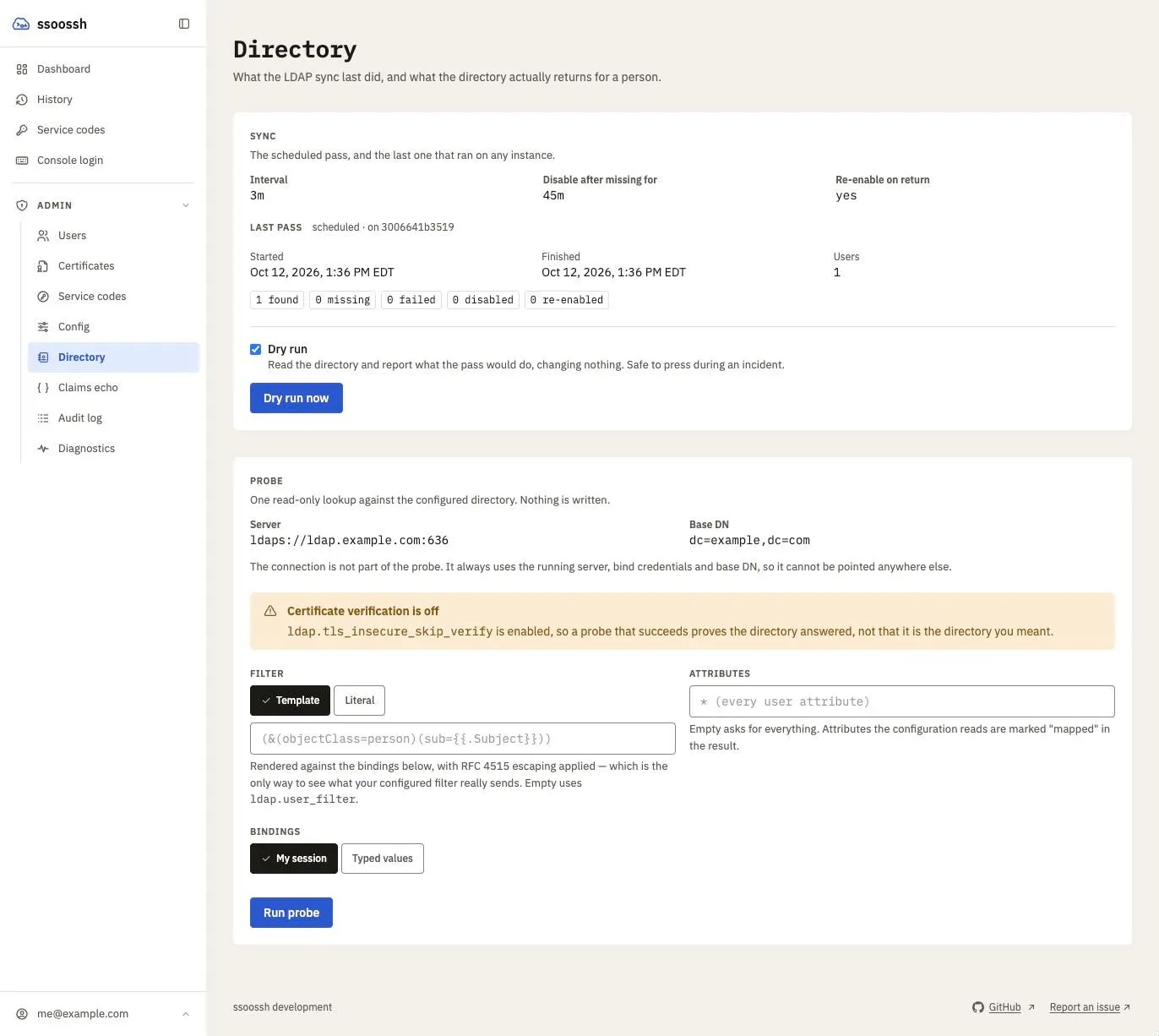
Admin → Directory. The sync half reports the last pass and lets an admin run one, dry or real; the probe half runs one read-only lookup with the server's own connection and shows what came back.
A binary identifier such as objectGUID is stored hex-encoded behind a 0x
marker, and rendered back into the \a1\b2... byte-escape form a directory
matches against. Nothing about that is visible in configuration – name the
attribute and it is handled.
Why the threshold is a duration
Section titled “Why the threshold is a duration”disable_after measures elapsed absence, not a number of passes. It has to,
because the number of passes is not a property of the user: scheduled jobs are
not leader-elected, so every instance runs every job, and three replicas
produced three increments per interval. A pass count of 3 at a 15-minute
interval therefore meant 45 minutes on one instance and 15 on three – and any
operator-triggered sync shortened it further.
consecutive_misses is still written and still shown, as a report of how many
passes have observed the absence. Nothing decides on it.
A configuration carrying the old spelling is rejected at startup rather than
reinterpreted: a bare disable_after: 3 would otherwise decode as three
nanoseconds and disable an account on its first miss. Write a duration –
45m, 24h – and anything under a minute is refused by name.
disabled_source is what makes auto-re-enable safe: the sync clears only
disables whose source is exactly ldap_sync, so an admin or SOC disable is
never undone automatically. The column is nullable and the migration backfills
nothing – rows predating it carry NULL, which the exact-match rule can never
touch.
An auto-disable is audited like any other containment action, as
user.auto_disabled with a generated reason.
When the sync disables an admin
Section titled “When the sync disables an admin”Admins are not protected from the sync: it disables them like anyone else, and a SOC user or another admin re-enables them. What changes is that an admin is told. Their session simply ends otherwise, with nothing saying why.
When a live pass disables a user, it checks whether they count as an admin.
The users row stores no roles, so the answer comes from the audit log: the
user’s most recent auth.login event in the last 60 days must carry a
group that the current configuration maps to admin
(admin.require_group). A
group that has since stopped granting admin no longer counts, and someone who
has not logged in for 60 days is not emailed. The login rows are read once per
pass, for every user at once, and only when the pass disables someone. The
snapshot only decides who is told: it grants nothing, and authority still
comes from the session. With
authoritative role groups on, the login’s groups
are narrowed by the user’s stored directory rows first, so an admin the
directory had stopped listing before the entry went missing is not emailed.
An admin who qualifies gets the admin_auto_disabled email at their stored
address, at their own email detail level. It says the account was disabled
automatically because its directory entry has been missing for longer than
disable_after, when, that a SOC user or an admin can re-enable it, and what
to check in the directory first. It is always sent: it is not a
notification preference, the preferences page offers no toggle for it, and it
arrives even when the admin has turned every other kind off. See
Email notifications.
Three things send nothing:
- A disable by hand. Only a disable whose source is
ldap_syncemails. An admin or SOC user disabling an admin sends no email. - A non-admin. Everyone else the sync disables gets no new email.
- Mail switched off. With
mail.enabledfalse the disable still happens and the sync logs that the admin was not emailed. Nothing fails. An admin with no stored address is logged the same way.
Side effect worth naming: the sync partially closes the revocation window.
Removing a user from the directory now disables the account within
disable_after of the first pass that notices, where previously removal took
effect only at their next login. Losing one linked account rather than the whole entry takes effect
on the person’s next request, since account lists are re-read per request.
Group downgrades – still in the directory, out of a role group – ride out
the session unless
authoritative role groups are on, in which case
they take effect on the person’s next request after the sync sees them. See
Roles and containment.
Running a sync by hand
Section titled “Running a sync by hand”/admin/directory shows the sync settings and the last pass on any instance,
and gives a button to run one. The page is admin-only, status included; see
Roles and containment. The pass is the same code path the scheduler
runs: a manual sync that behaved differently from a scheduled one would be a
diagnostic that lies.
Four rules make the button safe:
- Dry run is the default. A dry run reads the directory and changes
nothing – no refreshed attributes, no group rows, no miss windows, no
disables and no re-enables – and reports the disables and re-enables it
would have performed. A would-be disable of an admin is logged with
would_email=adminnext to “would auto-disable”, and no email is sent. It is the version to press during an incident, and it runs on one press. - A live pass asks first. With Dry run cleared, the page warns that a live pass can disable accounts, and pressing Sync now opens a confirmation naming the same consequence; nothing runs until it is confirmed. A failure is reported in that dialog.
- One at a time. A pass already in progress makes the request a
409rather than a second pass stacked over the same users. - It cannot bring a disable forward. The threshold is elapsed absence (see above), so pressing the button ten times does not disable anyone a single scheduled pass would not have disabled at the same moment.
Every pass, scheduled or manual, writes an ldap_sync_runs row: when it
started and finished, what triggered it, who pressed the button, which
instance ran it, the counts, and any error that stopped it. That row is what
lets a sync that ran be told from one that never fired – before it, the only
evidence was a log line on whichever instance happened to run the job. A pass
that could not reach the directory still writes its row, so an outage is
visible as a pass that ran and failed.
A manual sync is audited as ldap.sync_triggered, with the counts and
dry_run.
Forcing a sync from the command line
Section titled “Forcing a sync from the command line”A restart does not run a sync: the scheduled pass first runs one
ldap.sync.interval after the process starts, on purpose, since a sync that
disables accounts during boot is the hardest kind to interrupt. To force a
refresh from a shell or a script, without a browser session, run the same
pass on the server host:
ssoosshd -c /etc/ssoossh/ssoosshd.yaml ldap sync --dry-runssoosshd -c /etc/ssoossh/ssoosshd.yaml ldap syncssoosshd ldap sync --jsonIt is the pass Sync now runs, in the command’s own process, against the
database and directory the config file names: the LDAP pass, then the NSS
full sync when nss.enabled is on and the pass is not a dry run. Unlike the
button, a live pass is the default here; pass --dry-run to change nothing.
- Safe beside a running server. The scheduled syncs are not leader-elected, so every instance already runs its own, and the command is one more. On SQLite it is a second writer to the same file, which works: the server opens SQLite in WAL mode with a busy timeout, so the command’s writes wait for the server’s rather than failing.
- The schema must match. The database is never migrated by the command;
if its schema is not the one this
ssoosshdexpects, it refuses to run. Use the binary the server runs. - Mail goes out before it exits. An admin the pass disables is emailed
by the command itself, through the same templates and relay, when
mail.enabledis on. - Audited as the local CLI. The
ldap.sync_triggeredevent’s actor islocal-cli, with no user behind it; its detail carriesvia: cli, the host, and the operating-system account that ran it (os_user, andsudo_userunder sudo). The run row records the pass as manual with no admin.
The report is one fact per line, with a fixed label, so it can be grepped:
ldap sync completed (run 6c0d1e2f-... on ssh-1)dry run nousers 12found 10missing 1failed 1disabled 1re-enabled 0nss sync completednss accounts seen=40 created=2 updated=3 skipped=0 refused=0 failed=0 missing=1 tombstoned=0nss groups seen=8 created=0 updated=1 skipped=0 refused=0 failed=0 missing=0 tombstoned=0--json prints what POST /api/admin/ldap/sync returns instead. The
command exits non-zero, with the reason on stderr, when the directory could
not be reached or either pass failed; a pass that completed exits zero
whatever it concluded about individual users. The process log goes to stderr
(and to any log files the config names), so stdout is only the report.
Probing the directory
Section titled “Probing the directory”/admin/directory also carries a read-only probe, for the question a log line
cannot answer: what does the directory actually return for this person, and
what will my configuration make of it.
It runs the login path’s first two stages – the lookup and the field resolution – and stops before the write. Three views of one probe, in the order the questions come up:
- Entry as returned. Every attribute the directory sent back, not just the ones the configuration names, with the configured ones labelled “mapped”. This is the view that shows you the field you should have mapped.
- Field mapping. What each configured field resolved to, which attribute or search it came from, and whether the attribute was on the entry at all – which is what separates “empty” from “misspelled”.
- Merge and allowlist. What would have been persisted, and which group values would have been discarded for matching no configured name. The allowlist is why you cannot otherwise see the group you forgot to configure; this is what breaks that circle.
Below them, the config block that would keep whatever is being ignored. A suggestion, not a decision: it says what would capture a value, not that capturing it is right.
Template mode and literal mode
Section titled “Template mode and literal mode”The distinction matters because escaping is not opt-out.
In template mode the filter is rendered against the bindings through the same RFC 4515 escaping the login path uses, and the result is reported. That is the only way to see what your configured filter really sends:
config (&(objectClass=person)(uid={{.Username}}))binding Username = "o'brien)"sent (&(objectClass=person)(uid=o'brien\29))In literal mode the string is sent exactly as typed. Nothing is interpolated, so nothing is escaped – escaping a filter you wrote by hand would corrupt it.
Bindings are your own session or values you type. Typed values are what let you test someone’s entry before that person has ever logged in.
When the filter matches more than one entry
Section titled “When the filter matches more than one entry”Login refuses a lookup that finds more than one entry, so nobody is linked to the directory through it. The probe says so and lists what the filter matched: it counts the matches (up to 1000, or the directory’s own size limit, and then says “at least”), lists the first 20 DNs, and says how many more there were. The web console shows the same list under a “too loose” warning.
The DNs are usually the diagnosis. On lldap, (uid={{.Username}}) matches the
person and also the group cn=<name>,ou=groups when a group shares the name,
because lldap answers uid on group entries too. Add the object class:
(&(objectClass=person)(uid={{.Username}})).
The startup check (see user_filter)
only refuses a filter that references no identity field. A filter such as
(|(objectClass=person)(uid={{.Username}})) references one, passes, and still
matches everyone. This report is what catches it.
What the probe cannot do
Section titled “What the probe cannot do”It cannot be re-pointed. The connection is not part of the request: every
probe uses the running
ldap.url, bind credentials and
base_dn. Reusing the server’s bind
password against an operator-supplied URL would be a credential-exfiltration
primitive, and dialling an arbitrary host would make the server an
outbound-connection one. What an operator varies is the question, not who is
asked.
It cannot write. There is no persist call on the path at all: no
user_ldap row, no group rows, no miss window, no auto-disable. The response
carries that guarantee and a test asserts it.
That also means it cannot exercise anything the write does. In particular
ldap.limits.max_attributes_bytes
is enforced when the row is serialized, so a probe that resolves a very large
field set still succeeds while the login that resolves the same set fails.
The probe answers “what does the directory return and what will the
configuration make of it”, not “will it store”.
It is still admin-only and rate-limited per caller, and every probe is audited
as ldap.probed with the filter it sent. If
tls_insecure_skip_verify
is on, the result says so – a probe that succeeds only because verification
was off is not the same as one that verified.
From the command line
Section titled “From the command line”ssoosshd ldap probe runs the same lookup against a config file, with no
server up and no HTTP surface at all:
ssoosshd -c /etc/ssoossh/ssoosshd.yaml ldap probe --username alicessoosshd ldap probe --literal --filter '(&(objectClass=person)(uid=alice))'ssoosshd ldap probe --username alice --json| Flag | What it binds |
|---|---|
--username, --email, --subject |
the {{.Username}}, {{.Email}} and {{.Subject}} bindings the filter renders against |
--extra name=value |
one {{.Extra.<name>}} binding; repeatable |
--filter |
replaces the configured user_filter for the primary lookup – see below |
--literal |
send --filter exactly as typed, interpolating and escaping nothing |
--attributes |
which attributes to request; empty asks for every user attribute |
--json |
print the whole result as JSON, which is the form worth diagnosing from |
It reads the same config file the server does and binds as the same
ldap.bind_dn, which is what makes
it representative of login. Useful before the first start, since building the
service parses every filter template: a bad one fails here with the message
the next restart would have produced. It never opens the database. Whoever can
run it can already read the config file, and so already has the bind password.
Leave --filter empty
Section titled “Leave --filter empty”This is the single most important thing to know about the probe, and the easiest way to spend an afternoon testing the wrong thing.
Empty runs your configured
user_filter as the primary
lookup – exactly what login does.
Set replaces user_filter with what you passed, and runs that as the
primary lookup against
ldap.base_dn. You are no longer
testing your configuration; you are testing the filter you just typed.
Field searches run either way, against whichever entry the primary lookup
found. That is what makes the trap quiet rather than loud: pass a filter that
finds the right person and everything downstream still resolves, so the report
looks healthy while the user_filter you were trying to validate was never
sent. The same applies to the filter box in the web console.
Use --filter to answer “would this filter find the entry”, and empty to
answer “does my configuration work”.
Reading the JSON
Section titled “Reading the JSON”--json is the useful form, because the diagnosis is per search rather than
per field. Under each entry in Fields[].Searches[]:
| What you see | What it means |
|---|---|
Entries: 0 |
The filter, the base_dn, or the bind. Nothing matched, so nothing could be read. |
Entries: 1+, Values: [] |
The search found the entry and the value: attribute was not on it, or the bind account cannot read it. This is the silent one – login logs nothing and the field is simply empty. |
Error set |
The search failed outright. In the probe the remaining fields still resolve, deliberately, so you see every problem at once. At login the first such failure aborts the whole enrichment – not just that field – and the identity keeps its previously cached values. |
| the search absent entirely | That config block is not being loaded. Check where it sits in the file and that the field name is spelled as the server expects. |
Then check the Merge entry for the field. other_accounts and
service_accounts should read Action: "override". If one reads
Action: "extra", the field name is wrong: the server did not recognise it,
so it is being treated as a template field rather than an account list, and
nothing about the search itself will tell you that.
A search’s base_dn replaces the global one
Section titled “A search’s base_dn replaces the global one”ldap.fields.<name>.searches[].base_dn
is used instead of
ldap.base_dn, not appended to it.
It must be a complete DN. Leave it empty and the search inherits ldap.base_dn
whole, which is usually what you want.
Writing a relative fragment there – ou=Groups rather than
ou=Groups,dc=example,dc=com – produces Entries: 0 and looks exactly like
a filter that does not match.
“It works from ldapsearch but not in the app”
Section titled ““It works from ldapsearch but not in the app””Two different things differ, and both look like a filter problem.
You are not binding as the same identity. A hand-run ldapsearch binds as
you; the server binds as
ldap.bind_dn. Active Directory
answers a read the service account is not permitted with success and zero
results rather than a permission error, so an ACL gap presents as an empty
search. If the probe disagrees with your shell, suspect permissions before
syntax – and note the probe binds as the service account, which is exactly
why it is the tool to trust here.
You are not asking for the same attributes. ldapsearch with no attribute
list, and the probe’s own primary lookup, return every attribute on the entry.
A field search does not: it requests only the single attribute named by
value:. An attribute that appears in your shell output can still come back
empty from a field search, because the search never asked for that one.
Worked example: uid against Active Directory
Section titled “Worked example: uid against Active Directory”A field configured like this against AD:
ldap: fields: other_accounts: searches: - base_dn: "ou=Service,dc=example,dc=com" filter: "(manager={{.DN}})" value: "uid"Linked accounts never appeared at login, and nothing was logged. ldapsearch
showed the entries fine. The probe says why:
ssoosshd -c /etc/ssoossh/ssoosshd.yaml ldap probe --username alice --json{ "Fields": [ { "Name": "other_accounts", "Values": [], "Searches": [ { "BaseDN": "ou=Service,dc=example,dc=com", "FilterSent": "(manager=CN=Alice,OU=People,DC=example,DC=com)", "Value": "uid", "Entries": 1, "Values": [] } ] } ]}Entries: 1 with Values: [] is the second row of the table: the filter is
right and the entry was found, but value: names an attribute that is not
there. Active Directory has no uid – it uses sAMAccountName. ldapsearch
hid this because it returned the whole entry, while the field search asked for
uid alone and got nothing back.
Changing value: to sAMAccountName fixes it, and the same probe then shows
Entries: 1 with the account in Values.
The uid in the configuration reference is an OpenLDAP-flavoured example.
There is no portable answer here: the attribute that holds an account name is
directory-specific, and the probe is how you find out which one yours uses.
Cost and freshness
Section titled “Cost and freshness”The login lookup adds one directory round trip, bounded by
ldap.timeout, and only when
enabled. If it fails, enrichment falls back to the attributes stored by the
last successful read, so an outage degrades to slightly stale data rather than
a thinner certificate.
The sync costs (users with a user_ldap row) x (1 + configured field
searches) directory operations per tick. Per-user results are small; the
multiplier is what to choose the interval against.
Refresh semantics mid-session: the account-list fields and the extra fields
are re-read on every authenticated request, merged the way a login merges them
– the OIDC values from the users row, then the directory values from
user_ldap.attributes over the top. A sync that removes a shared account
therefore takes that principal away from live sessions on their next request,
not at their next login, and the account page shows what the person can
actually mint with.
Group membership is the deliberate exception: roles are read at login and never re-read, so the session lifetime stays the revocation window for a role (see Roles and containment). The opt-in exception to the exception is authoritative role groups, which lets each request drop a role group the directory no longer lists, at the cost of two small reads per request for someone holding a role.
Notifications fan-out
Section titled “Notifications fan-out”With user_groups in place, a group-targeted notification is a recipient
resolver rather than a new subsystem: a group name resolves to the enabled
users with an email address.
Accepted limitation: fan-out reaches only users who have logged in at least once, because only they have rows. The sync does not create shadow users for directory members who have never authenticated; enumerating a directory to email strangers is a different feature with different consent implications.
With ldap.enabled: false, only the OIDC rows resolve – see
Switching the directory off.
Out of scope
Section titled “Out of scope”- Authorization from persisted groups. See the invariant above. The directory can take a role away with authoritative role groups, and nothing it stores can grant one.
- Directory enumeration and shadow users.
- LDAP as an authentication source. OIDC authenticates; LDAP only ever enriches.
- Kerberos GSSAPI bind. Tracked separately as a design proposal. The flat
bind_dn/bind_passwordkeys ship as the implicit “simple” mechanism, so abind.mechanismblock can slot in later without breaking existing configs.