Service certificates
A nightly backup job, a CI runner pushing artifacts, a file transfer on a timer: work that needs SSH at 3am with nobody there to approve anything. The service path involves a person exactly once, at enrollment. Everything after that runs without a browser.
What it replaces
Section titled “What it replaces”The usual answer for an unattended job is a long-lived key in
authorized_keys that nobody rotates and nobody can attribute. Here the job
holds an enrollment code instead, bound to one keypair and one authorized
option set, and every redemption is logged against the account it mints for.
4a. Enrollment: key registration
Section titled “4a. Enrollment: key registration”sequenceDiagram
accTitle: Service enrollment, step one: registering the key
accDescr {
An operator asks the ssoossh client to enroll a service keypair. If both
files of the keypair already exist on disk they are used as-is, and if
only one does the client refuses, since ssh needs the private key beside
the public one. If neither file exists the client generates the pair, writing the private key 0600
(owner-only on Windows) and the public key alongside it with a .pub
suffix; neither file is ever overwritten. The client posts the public
key, receives an authorization URL, and opens a server-sent events
stream to wait.
}
autonumber
actor User
participant Client as ssoossh client
participant Server as ssoossh server
User->>Client: enroll a service keypair
alt both files are already on disk
Note over Client: the existing pair is enrolled as-is<br/>(only one of the two is refused)
else neither file exists yet
Client->>Client: generate keypair
Note over Client: private key written 0600 to the named path<br/>(owner-only access list on Windows),<br/>public key to #lt;path#gt;.pub. Neither is overwritten
end
Client->>Server: POST public key
Server-->>Client: authorization URL
Client->>Server: open SSE stream and wait
- An operator runs
ssoossh service enroll --key <path>. - One flag decides both branches. If neither
<path>nor<path>.pubexists, the client generates the keypair. If both exist, that pair is enrolled and no key is generated. If only one of them exists, enrollment stops with an error naming the missing file, becausesshneeds the private key beside the public one. Neither file is overwritten. - The client posts the public key to the server.
- The server answers with an authorization URL.
- The client opens an SSE stream and waits, exactly as the interactive flow does.
The key files follow OpenSSH naming: the private key is <name>, the public
key is <name>.pub, and the certificate, once retrieved, is
<name>-cert.pub. All three must sit in the same directory for ssh to find
them.
4b. Enrollment: approval and the enrollment code
Section titled “4b. Enrollment: approval and the enrollment code”The browser approval is the same as stage 1b. What comes back is different.
sequenceDiagram
    accTitle: Service enrollment, step two: approval and the enrollment code
    accDescr {
      The operator authenticates in a browser and approves, choosing which
      service account the enrollment is for. The server binds an enrollment
      code to both that public key and the authorized option set, then returns
      the code, the service account and the code’s expiry to the waiting
      client, which prints the code, whose it is, when it dies and how to use
      it.
    }
    autonumber
    actor User
    participant Browser
    participant Server as ssoossh server
    participant Client as ssoossh client

    User->>Browser: authenticate and approve,<br/>choosing a service account
    Server->>Server: bind code to this public key<br/>AND the authorized option set
    Server-->>Client: enrollment code, service account,<br/>code expiry
    Client->>User: print the code, whose it is,<br/>when it dies, and how to use it
- The approver authenticates, picks which of their own service accounts the enrollment is for, and reviews the options before approving.
- The server binds the code to both the enrolled public key and the authorized option set.
- The code, the service account, and the code’s expiry come back to the waiting client.
- The client prints the code, whose it is, when it stops working, and the exact command to redeem it with.
The code is printed once and stored nowhere. It is a bearer credential –
anyone holding it can obtain certificates for that service account until the
enrollment expires – and where it belongs is wherever the unattended job will
read it, which only the operator knows. So service enroll prints it along
with the service retrieve command to run, and service retrieve reads it
from --code.
The chosen account and the expiry travel with the code because the operator at
the terminal never sees the approval screen. Without them, the only way to
learn which principal the certificates carry would be to retrieve one and
inspect it. The account is set by the approver from their own linked accounts,
and it is the sole principal of every certificate the code redeems. The expiry
bounds the code
(cert_options.service.enrollment_duration),
not those certificates, which get their own lifetime at each redemption from
cert_options.service.valid_duration.
Because the account comes back with the code, the printed ssh_config recipe
names it: the Match user block keys on the service account rather than a
placeholder the operator has to fill in.
Afterwards the approver can see what they granted, without the code, at Service codes in the web UI: one row per approved enrollment, opening into which account it mints for, the options and certificate lifetime fixed at approval, the keypair it is bound to, when it stops being redeemable, and its redemption log. Every holder of an account sees its codes, whoever approved them.
4c. Unattended reissue
Section titled “4c. Unattended reissue”sequenceDiagram
accTitle: Unattended reissue with an enrollment code
accDescr {
A scheduled job asks the ssoossh client for a certificate. The client
posts the enrollment code and nothing else. The server looks up the
public key that code was enrolled against, applies the authorized option
set recorded with it, and returns a certificate. The client
authenticates to the target host’s sshd, and the job gets its session.
No browser and no human are involved.
}
autonumber
participant Job as scheduled job
participant Client as ssoossh client
participant Server as ssoossh server
participant Host as target host sshd
Job->>Client: need certificate
Client->>Server: POST enrollment code only
Server->>Server: look up enrolled public key,<br/>apply authorized option set
Server-->>Client: certificate
Client->>Host: authenticate with certificate
Host-->>Job: session
- The job needs a certificate, so it runs
ssoossh service retrieve --code ... --key <path>. - The client posts the enrollment code, and only the code.
- The server looks up the enrolled public key and applies the option set that was authorized at approval.
- The certificate comes back and is written to
<name>-cert.pub. sshpresents it to the target host.- The job gets its session.
The public key is not resubmitted, so a stolen code cannot be paired with an attacker’s own keypair. The same keypair is used every time: no new key, no browser, no user.
service retrieve is built to be run on a timer or from a Match exec line
without generating traffic it does not need:
- It skips the server entirely and exits 0 when the certificate on disk is
still valid beyond
--grace, which defaults to 1 minute.--forceoverrides that. - If retrieval fails but a still-valid certificate exists, it warns and exits 0, so a briefly unreachable server does not break the job. That needs the CA key the client caches after its first successful contact: a first run as that user, or one with no home directory, cannot start without the server and exits non-zero.
- Only when there is no readable, valid certificate does it fail with a non-zero exit.
What the record shows
Section titled “What the record shows”Each redemption is logged, and the serial ties the two halves together: it is allocated before the signing job is queued, written to the retrieval row, and lands on the issued certificate. That is what lets the certificate history report the address a service certificate was actually fetched from, which is a different fact from the approval’s source IP – that one belongs to the human who approved the code and is identical on every certificate it mints.
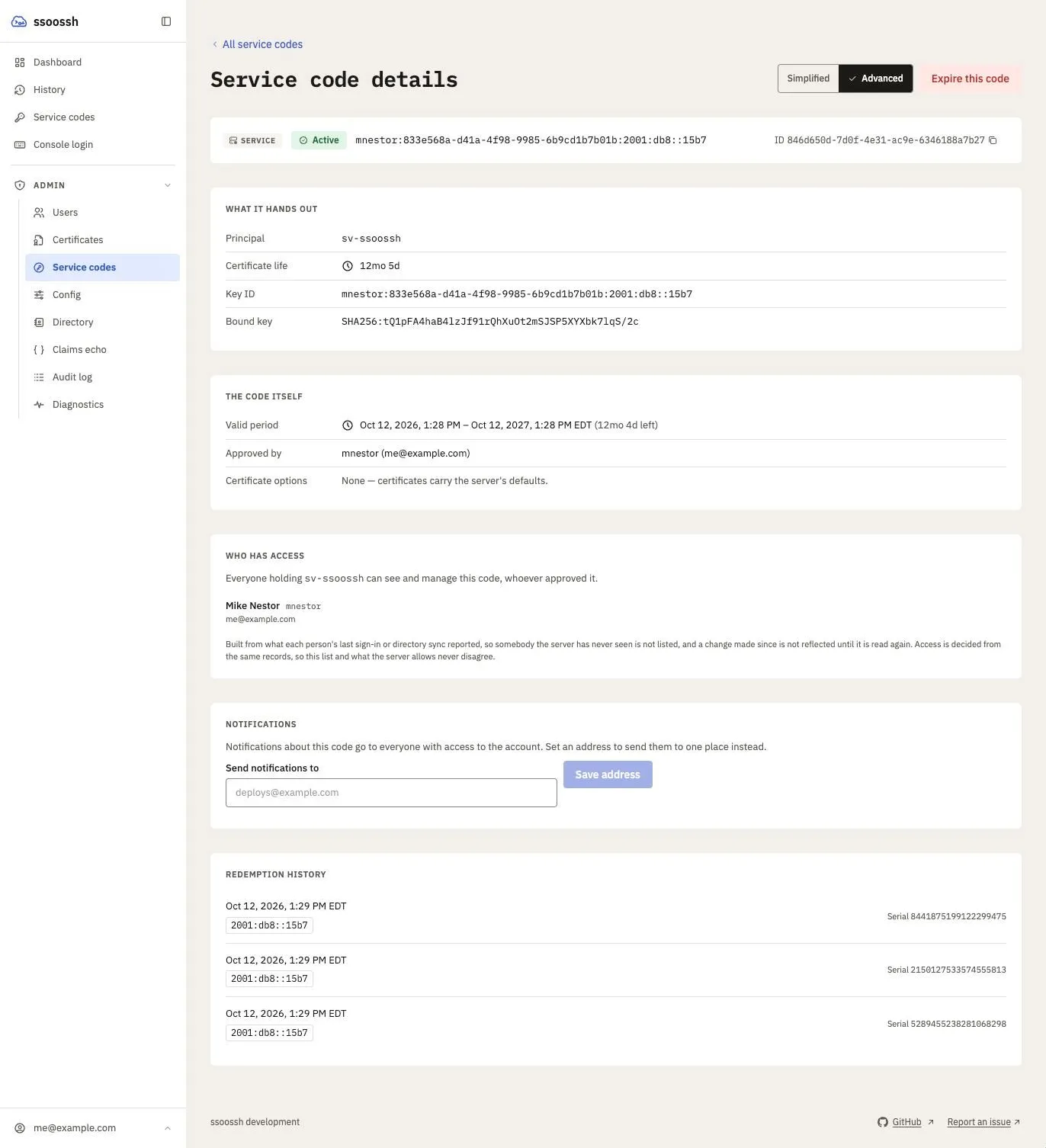
A code's record as SOC sees it. The redemption history is the retrieval log; each entry's serial is the one on the certificate that fetch produced.
Policy is not evaluated again at retrieval. Every certificate a code mints
carries the principals, options and lifetime fixed when it was approved, so
nothing changes underneath the job between one redemption and the next, and
a ceiling lowered after approval does not shorten a code’s certificates. The
one check at signing is the absolute cap,
max_service_cert_lifetime,
which refuses a certificate longer than it rather than shortening it.
Disabling the person who approved an enrollment does not stop the job. Service enrollments belong to the service account, not to the approver, so the account’s other holders keep control and unattended work keeps running. Ending an enrollment early is its own action – Expire this code on the code’s page, open to any holder of the account and, for any account, to SOC from Admin → Service codes – and it is idempotent.
Two worked shapes
Section titled “Two worked shapes”A nightly backup. Enrol a keypair on the backup host, put the code in the
unit’s environment file (root-owned, mode 600), and have the timer run
service retrieve before rsync. The certificate is refreshed only when the
one on disk is close to expiry.
A CI runner. Enrol once from a workstation, store the code in the CI system’s secret store, and retrieve at the start of a job that needs SSH. The runner never holds a key that outlives the enrollment, and the redemption log shows every build that used it, with the address it came from.
Where this is configured
Section titled “Where this is configured”| What | Key or flag |
|---|---|
| How long a code stays redeemable | cert_options.service.enrollment_duration |
| Lifetime of each certificate the code mints | cert_options.service.valid_duration |
| Who may approve a service enrollment | cert_options.service.require |
| Extensions a service certificate may carry | cert_options.service.extensions |
| Which accounts count as service accounts | authentication.fields.service_accounts |
| The absolute service ceiling | max_service_cert_lifetime |
| Key ID for service certificates | cert_options.service.key_id_template |
| Enrollment and redemption email | mail |
| Where the code is read from | --code on ssoossh service retrieve |
| Where the keypair lives | --key on ssoossh service enroll and service retrieve |
Related
Section titled “Related”- Service accounts – the operator’s walkthrough, with commands.
- Options and lifetime resolution – what “the authorized option set” is made of.
- Email notifications – the enrollment and redemption kinds, and why the code is in none of them.
- Audit log – the redemption record.
- HSM and PKCS#11 – for a private key that should never touch disk.
- HTTP API – the enrollment endpoints.